Reseller panel
The reseller panel (reseller/) lets third-party resellers create and
manage viewer accounts on your service without holding real admin power over
your panel. It is a standalone HTTP service with its own
dashboard that sits in front of the panel admin API: every
account a reseller activates, renews, suspends, or deletes becomes a call to
that API — but only after passing this service's role hierarchy and
credit ledger checks.
It is optional and self-contained, like the repeater and VOD library: a separate workspace, its own store, its own Docker Compose profile. It can run on the panel host or on a different machine.
Why it exists — two gaps it fills
The panel deliberately keeps two things simple, and the reseller panel supplies what a reselling business needs on top:
- The panel has no admin roles. Every panel admin can do everything — there is no scoped "reseller" admin to hand out. So the whole hierarchy lives in the reseller panel, which authenticates to the panel as one dedicated full-privilege admin account. Resellers never get panel credentials.
- The panel has no account expiry. Panel accounts are active until someone disables them. Subscriptions need a clock, so the reseller panel owns it: it records each account's expiry and, when a subscription lapses, disables the account on the panel (the expiry sweep).
A tour of the dashboard
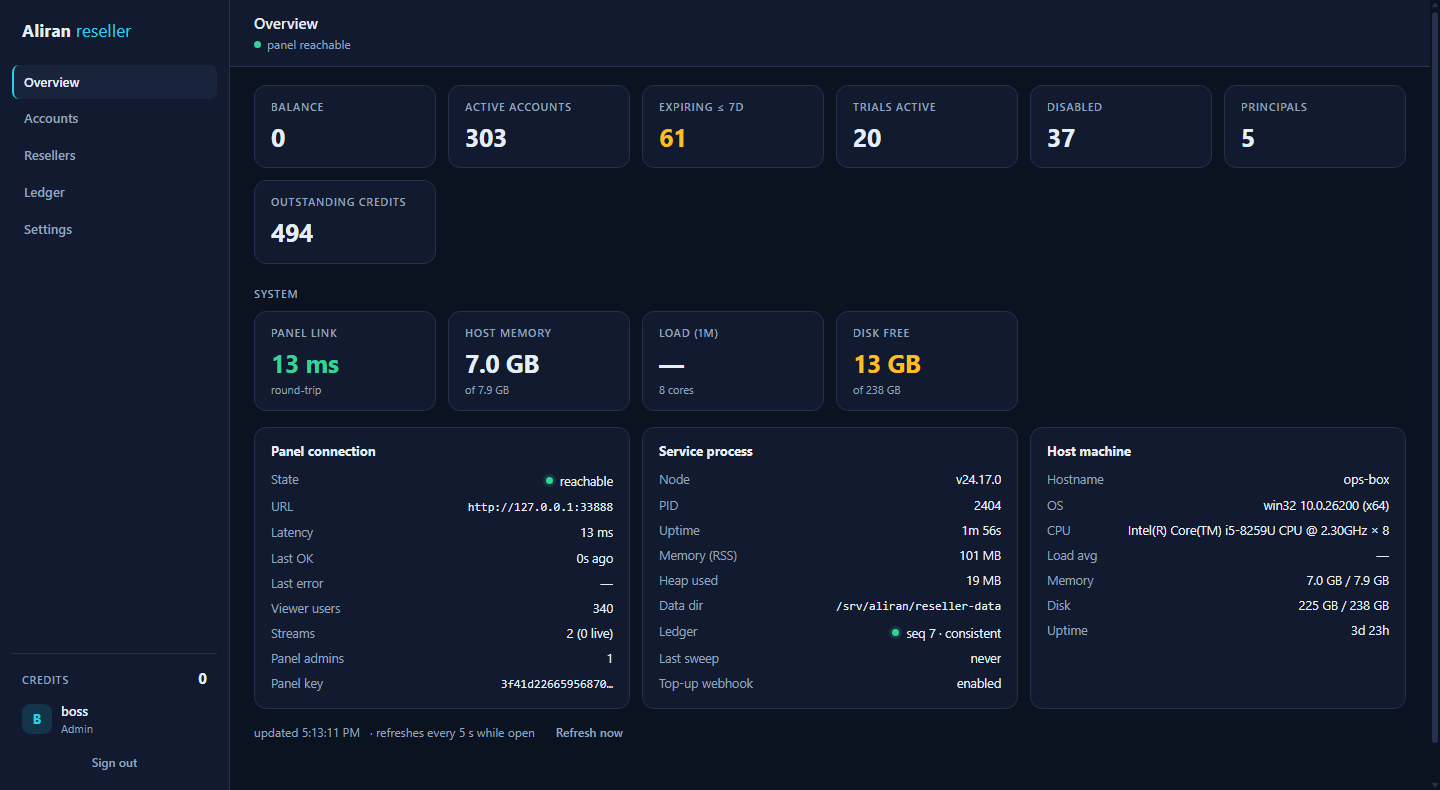
Signing in lands on the Overview — an ops dashboard: the business KPIs, and for admin tiers a live System section (panel-link latency, host health, the service process, top-up webhook state), polling while the view is open:
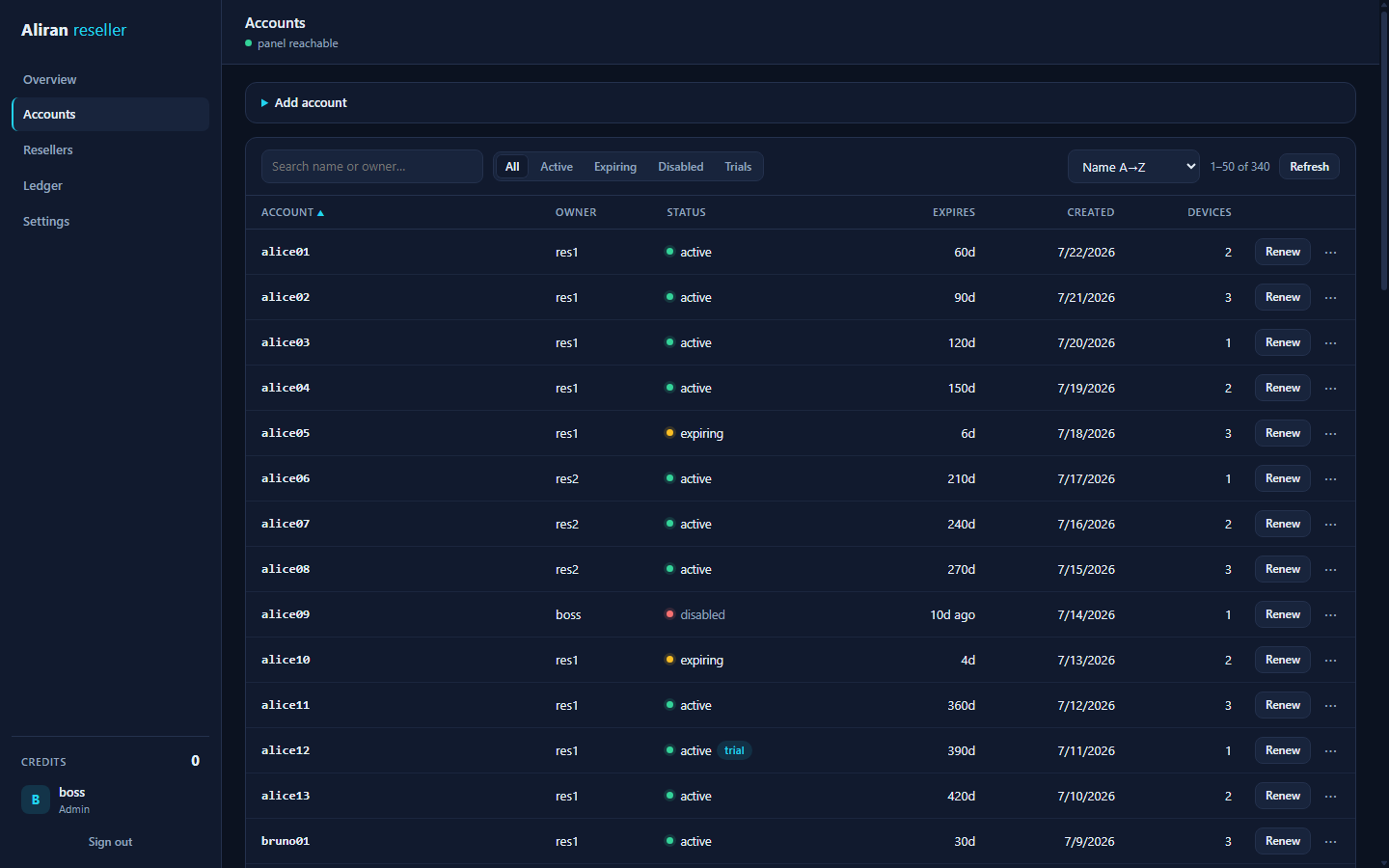
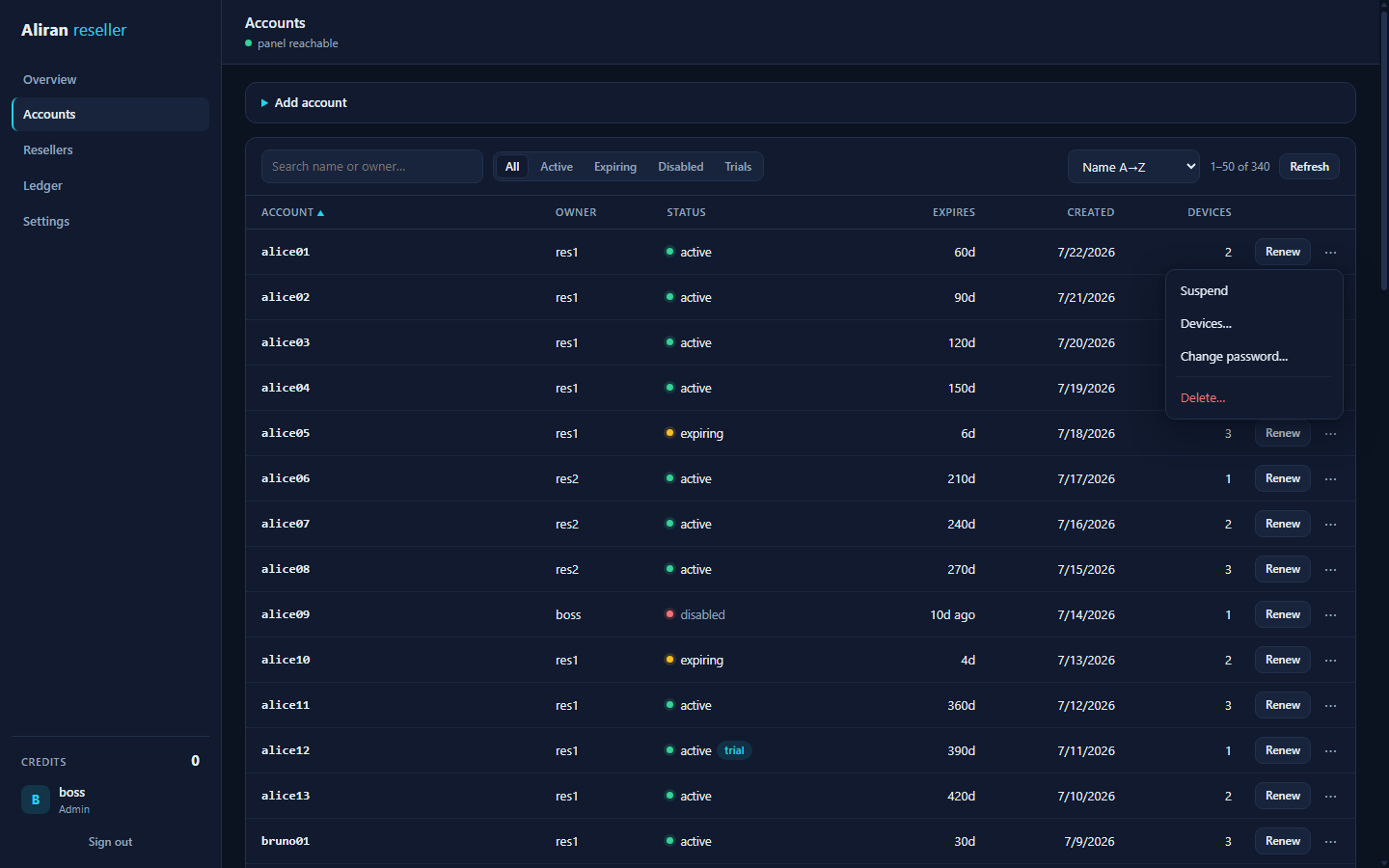
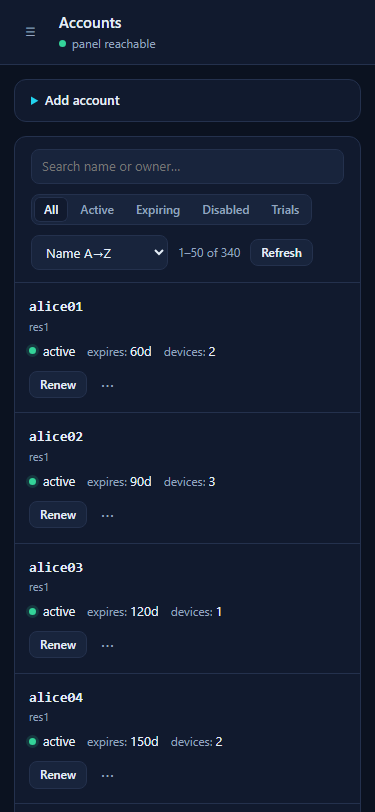
Accounts is built for large books — 50 per page with server-driven search, filters and sorting, status dots, and one quick action (Renew) plus a ⋯ menu per row:
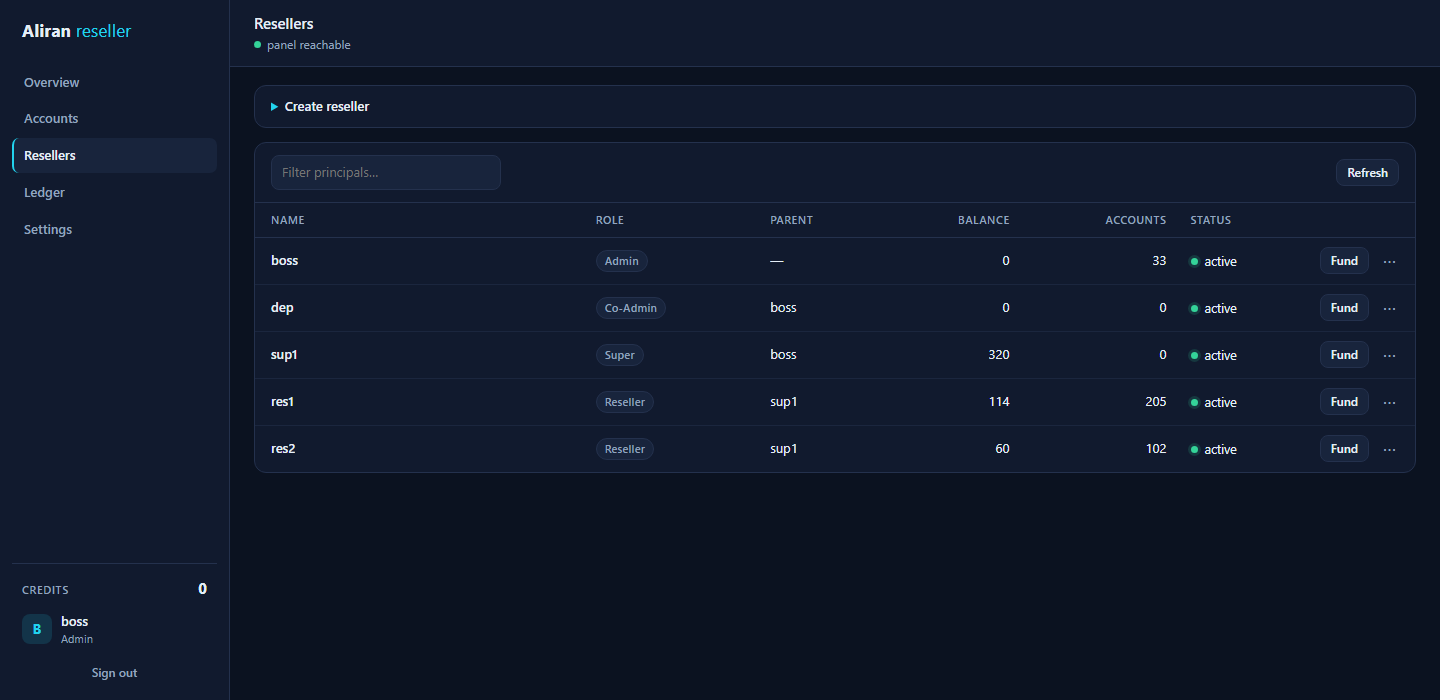
Resellers manages the hierarchy (fund, reclaim, limits, suspend, delete), and on phones the accounts table reflows into stacked cards:
The whole surface white-labels from env — name, logo, favicon, login backdrop, and the full colour theme; see the rebrand manual. It also reads in English or Spanish, selected on the login card or in Settings — see Language.
Roles
A strict hierarchy, top to bottom. Each principal has a parent, and a principal can only ever act within its own subtree.
| Role | Can | Notes |
|---|---|---|
| Admin | Everything. Mints credits. The only role that can create/delete co-admins. | Exactly one root admin, seeded by the CLI, undeletable. |
| Co-admin | A full admin clone — including minting — so you can hand out a second all-powers login with its own audit trail. | Cannot manage other co-admins or the root (root-only territory). |
| Super reseller | Creates resellers under itself, funds them from its own balance, manages only its own subtree. | |
| Reseller | Activates / renews / suspends / deletes its own viewer accounts, spending its own balance. |
Credits
Credits are months: 1 credit = 1 month, flat (the month length is
DAYS_PER_MONTH, default 31). The number of devices an account allows
(maxDevices) does not change the price, and it is not a reseller choice
at all — see the device policy below.
Device policy — admin-set, inherited
How many simultaneous devices an account allows is policy, owned by the
admin tiers, and it inherits down the hierarchy: a principal without an
explicitly set maxDevicesLimit uses its parent's effective value (the
root's fallback is MAX_DEVICES_LIMIT_DEFAULT). Resolution is live —
change a super's value and every reseller under it that has no explicit value
of its own follows instantly, with no cascade writes, so a subtree stays
consistent by construction.
- Admins/co-admins set (or clear back to inherit) the value per
principal in the Limits dialog or via the API (
maxDevicesLimit: null= inherit). Supers see it read-only there; they still tune trial caps. - New accounts and trials simply receive the creator's effective policy
value — resellers cannot pass
maxDevices(the API rejects it loudly). Every principal view reports the effective value plus amaxDevicesLimitInheritedflag. - Admin tiers keep a per-account override
(
POST /api/accounts/:acct/max-devices, ormaxDeviceson their own activations) — an operator exception, not part of the reseller flow. -
A policy change applies to future activations; existing accounts keep their value until an admin overrides them (the reconcile sweep keeps the panel matching each account's registry value either way).
-
Minting — only admins and co-admins create credits (from nothing). Even an admin's transfer debits their own balance, so the ledger always shows where every credit came from.
- Allocating down — a super reseller funds its resellers from its own balance (an atomic paired debit/credit). Reclaim pulls credits back, capped at what the child still holds.
- Spending — activating or renewing an account costs
monthscredits, debited from the actor. Admin-tier account operations are free (and write no ledger entry — they are operator actions, not part of the credit economy). - Refunds — deleting a paid account refunds
floor(remaining months)to the account's owner. Admin deletes refund nothing.
The ledger is an append-only file — it is the durable audit trail (the panel's own activity feed is in-memory and cleared on restart). Balances are always derived from it, never stored, so they can never drift.
Channel packages (bouquets)
Channel packages are defined
on the panel (name, members, default flag). The reseller panel consumes
them as the product unit: a package sets what the account gets, and
credits set for how long. Packages carry no credit price and no
per-reseller restriction layer — every principal that manages accounts sees
the full package list and may assign any of them, and an activation with
three packages costs exactly the same months credits as one with none.
- Activation — the Add-account form has a package multi-select (live
resolved-channel counts) beside the per-stream picker, labeled extra
channels (one-offs). The panel's
defaultpackages come pre-checked; an explicit pick is the whole choice and replaces the defaults (unticking one is deliberate), while a package-less activation keeps whatever the panel's defaults granted. The API mirror ispackagesonPOST /api/accounts. - Account view — Channels & packages… in the row menu shows the live
entitlement with provenance chips: ▣ package,
one-off, and dashedauto(source auto-grants, which have no revoke here — they come back on the next sync by design). Manage packages… replaces the account's bouquet list (POST /api/accounts/:acct/packages, panel-validated — a typo is an error, not a silent no-op). - Honest covered revokes — revoking a one-off on a channel one of the
account's packages still covers removes the manual entitlement, and the
panel re-seals the channel in the same request. The response says so
(
stillGranted: true), and the dashboard toasts "still granted via package …" instead of pretending it is gone. - The registry remembers the choice — the chosen bouquets are recorded per account, and the reconcile sweep re-asserts them if the live panel record drifts. An account with no explicit choice is left panel-driven: the sweep never strips the panel's default packages.
- Trials are unchanged: the panel applies its
defaultpackages to them at creation, panel-side.
Automated credit top-ups (payment webhook)
Minting by hand does not scale to selling credits. Set WEBHOOK_SECRET (a
long random value, 32+ chars — it is the only thing authenticating a mint)
and the service enables POST /api/webhooks/credits: your payment provider's
success handler (or your own shop backend) posts
{ "id": "<unique event id>", "to": "<principal>", "amount": 10, "note": "order #1001" }
and the credits land as a normal MINT ledger line with actor webhook and
the event id in the note — the audit trail stays complete. The security model
follows the Stripe-webhook shape:
- Signed:
x-topup-signature= hexHMAC-SHA256(secret, "<timestamp>.<raw body>")withx-topup-timestamp(unix seconds). The comparison is constant-time, and a timestamp outside ±5 minutes is rejected, which kills replays outside the window. - Idempotent:
idis the delivery key. Payment providers retry webhooks on timeouts — a repeatedidanswers200 {duplicate:true}and mints nothing, so a retry can never double-credit. - Fail-dark: without
WEBHOOK_SECRETthe route answers 404, indistinguishable from not existing.
Signing example (node — the same five lines work in any language):
const ts = Math.floor(Date.now() / 1000)
const body = JSON.stringify({ id: payment.id, to: buyer, amount: months })
const sig = crypto.createHmac('sha256', process.env.WEBHOOK_SECRET)
  .update(`${ts}.${body}`).digest('hex')
await fetch('https://resellers.example.com/api/webhooks/credits', {
  method: 'POST',
  headers: { 'content-type': 'application/json', 'x-topup-timestamp': String(ts), 'x-topup-signature': sig },
  body
})
Use your payment provider's own event id (for example, the Stripe
event.id) as id, and only fire on a final payment state. Expose the
endpoint the same way as the dashboard (TLS via Caddy or the Cloudflare
Tunnel — never plain HTTP across the internet); the System card on the
Overview shows whether the webhook is enabled.
White-labeling
The dashboard white-labels at runtime, entirely from env, with no build step:
BRAND_NAME (login card / sidebar / tab title), BRAND_LOGO_FILE (replaces
the brand text with your logo), BRAND_FAVICON_FILE, and BRAND_THEME_FILE
(JSON overriding any of the 11 shared theme tokens, for example
{ "accent": "#F59E0B", "accent-dim": "#B45309" }). Overrides are served as
/branding.css layered after the stylesheet's shared theme block, so the
byte-identical block the theme test enforces is untouched.
The full manual — every variable, image formats and sizes, and what each of the 11 colour tokens paints — is in White-label branding → Reseller panel dashboard.
Language
The dashboard is available in English and Spanish. A Language
control is on the login card and in Settings. The text changes
immediately. You do not have to sign in again.
The choice belongs to the browser, not to the principal, and it is kept in
localStorage. Two things make that the correct place:
- The sign-in card needs a language too, and before sign-in there is no principal to hold a preference.
- It needs no API route, no store write and no env variable. Nothing on the box changes when a reseller selects a different language.
If there is no stored choice, the dashboard follows the browser's language. If it does not have that language, it uses English.
Language and white-labeling do not touch each other. A translation never
changes the brand headings, /branding.json or /branding.css. BRAND_NAME
and your logo stay the same in each language.
Some text stays in English on purpose:
| Text | Why |
|---|---|
| Account names, principal names, ledger notes, channel titles | This is your data. The dashboard shows it as it is. |
| API error messages | The service writes them, and it also writes them to its log. |
The why and assumes lines on the Backup card |
@aliran/core writes them, and four services share that code. |
To add a language
The catalog is reseller/control-ui/i18n.js: one plain script, no build step
and no dependency. The viewer apps' @aliran/i18n package does not apply here
— this dashboard has no bundler, and the control server sends a flat list of
.html, .js and .css files only.
- Add the code and the autonym (the language's name in its own language) to
LOCALES. - Copy the
CATALOG.enblock and translate the values. - Run
npm run test:i18n.
The test fails if a key is absent or empty, if a {placeholder} is not in the
translation, if a [[code token]] was translated, or if the dashboard uses a
key that no catalog has.
Trials
Resellers can start free, time-boxed trial accounts (TRIAL_HOURS,
default 24), capped per reseller per day (trialDailyCap). A trial is a
normal viewer account with a short expiry; the expiry sweep disables it like
any lapsed account. Renewing a trial converts it to paid — same username
and password, coverage starting from now — the natural upsell.
Account names and ownership
Viewer account names are plain panel usernames — no prefixes. Names are a global, first-come-first-served space: if a reseller picks a name an existing panel user already has, the panel's own "exists" error surfaces and they pick another. Ownership never depends on the name — the reseller panel's registry records which principal owns each account, and a reseller can only ever see and operate on accounts the registry says are theirs. Operator-created panel users are invisible to the reseller panel entirely.
The accounts list is built for density: search (name or owner, case-insensitive), status filters, and sorting (name, expiry, created date, status, owner — ascending or descending) all run server-side. The dashboard shows 50 per page with prev/next and a jump-to-page selector, so the table behaves identically at 10 accounts or 10,000, and its rows reflow into stacked cards on a phone. Admins and super resellers can click any owner to drill into just that reseller's accounts.
Keeping panel and ledger in sync
Every account operation is fail-closed: the panel is called first, and the local ledger and registry commit only if the panel accepted it. A rejected activation (out of credits, name taken) leaves nothing behind — no panel user, no ledger line.
Two background loops keep the two sides aligned:
- Expiry sweep (
SWEEP_INTERVAL_SEC, default 300 s) — disables accounts whose subscription has lapsed. Its work list is derived from expiry each tick, so if the panel is briefly unreachable it simply retries next tick (and backs off to 15-minute checks until the panel returns). - Reconcile sweep (
RECONCILE_INTERVAL_SEC, default 1 h) — checks every account in the registry against the panel and reports divergences (a status mismatch, an account missing panel-side). Creates are additionally bracketed by an intent journal — recorded before the panel call, cleared after the local commit — so a crash in that window leaves a stale intent the sweep chases: if the panel user exists but was never committed locally, that orphan is disabled (never deleted) and reported. WithRECONCILE_REPAIR=1repairs apply, always letting the local subscription clock win; with the default0it only reports (tostate/reconcile.jsonand the dashboard).
Deployment topologies
The reseller panel reaches the panel admin API at PANEL_ADMIN_URL. Two
shapes:
Single box — reseller panel on the same host as the panel.
PANEL_ADMIN_URL is loopback (http://127.0.0.1:3210); nothing about the
panel is exposed.
┌─ host ─────────────────────────────────┐
│  panel :3210 (loopback)  ◄── reseller   │
│                              panel :3330 (behind TLS) ──► resellers
└────────────────────────────────────────┘
Two boxes — reseller panel on separate hardware (its own trust boundary,
its own scaling). The panel's admin API must be reachable from the reseller
box, so publish it over TLS and restrict it to that box's IP (the
reseller panel is the only client — an IP allowlist is a real second gate
that, unlike HTTP Basic auth, also protects /api/*; see below).
┌─ panel box ───────────┐        ┌─ reseller box ──────────┐
│ panel :3210            │◄──TLS──│ reseller panel :3330    │──► resellers
│ (published, IP-allow-  │  admin │ (behind TLS)            │
│  listed to reseller box)│  API  └─────────────────────────┘
└───────────────────────┘
Exposing the dashboard safely
Like the other dashboards, the reseller panel binds 127.0.0.1 and speaks
plain HTTP — put Caddy in front for TLS. Because it
is meant to be used by third parties, the strong recommendation is to add
an IP allowlist in front of it (and, on the two-box setup, in front of the
panel admin API it calls). deploy/Caddyfile.example carries a worked
reseller.example.com block.
Basic auth must exclude /api/* here too
HTTP has one Authorization header, and the dashboard already uses it
for its own Bearer login, so a Caddy basic_auth gate must exclude
/api/* — otherwise it clobbers the Bearer token. The example handles
this. An IP allowlist is the layer that actually protects the API.
No public IP? Cloudflare Tunnel
When the reseller box sits behind NAT/CGNAT or a firewall you cannot open,
but your resellers still need to reach their accounts from the internet,
Cloudflare Tunnel
is the supported alternative to Caddy. cloudflared runs next to the service
and makes an outbound-only connection to Cloudflare's edge. Cloudflare
terminates TLS on your hostname and proxies requests down the tunnel. No
inbound port ever opens, and the origin IP is never published. Everything
this setup uses — the tunnel itself and the CF-Connecting-IP header — is on
Cloudflare's free plan (a free account with your domain on it is enough;
the optional extras below are free-tier too: Access up to 50 users, and the
free allowance of WAF custom rules).
deploy/cloudflared.compose.example.yml is the worked example, and it uses
an isolated compose network: the reseller service and cloudflared share
a private bridge network, and the dashboard port is never published to the
host — the tunnel is structurally the only way in. The flow is: create a
remotely-managed tunnel in Zero Trust, copy its token into reseller/.env as
TUNNEL_TOKEN, add a public hostname pointing at http://reseller:3330 (the
compose service name), then run docker compose --project-directory . -f
deploy/cloudflared.compose.example.yml up -d --build (instead of
--profile reseller; same image and data volume).
What makes it as secure as the Caddy path:
TRUST_PROXY_HEADER=cf-connecting-ip(preset in the example). Behind any proxy, every connection reaches the service from the proxy's socket address, so the login lockout'susername|ipkey would treat all your resellers as one client — one abuser could lock a victim's username for everybody. With the header declared, the throttle keys on the real client IP that Cloudflare stamps on each request. The usual caveat — never trust the header if the port is also reachable directly — is satisfied by construction here: nothing outside the compose network can reach the port to spoof it, and Cloudflare's edge overwritesCF-Connecting-IPon every proxied request, so it cannot be smuggled through the front door either. (Running behind Caddy/nginx instead? The same option takesx-forwarded-for; the rightmost list entry — the one the trusted proxy appended — is used, and the direct-reachability caveat is then yours to enforce.)CONTROL_HOST=0.0.0.0is correct inside this topology (also preset): it binds the container's interfaces on the private network, which is not reachable from the host's LAN because no port is published. On any topology where the port IS published, keep the loopback default.- IP allowlists move to Cloudflare. The origin only ever sees the tunnel,
so
remote_ip-style rules belong in a Cloudflare WAF rule, or put Cloudflare Access in front of the hostname. Access authenticates the browser with its own cookie, so unlike HTTPbasic_authit does not collide with the dashboard'sAuthorization: BearerAPI login and can cover/api/*too. Either way the dashboard's own argon2 + lockout login remains the application gate.
The same pattern works for the panel/broadcaster dashboards, but those are single-operator surfaces — the SSH tunnel or Caddy answers are usually enough. The reseller panel is the one built for third parties, which is why the tunnel option is documented here.
Bootstrap walkthrough
- On the panel host, create the dedicated admin the service signs in as (never a human admin's credentials):
cd panel && node src/admin-cli.js add-admin reseller-svc
The command asks for the password. It is never an argument. Keep the password:
step 2 puts it in PANEL_ADMIN_PASS. In a script with no terminal, pipe it in
(printf '%s\n' "$PW" | node src/admin-cli.js add-admin reseller-svc), or use
--password <pw> — but argv is visible in ps and in the shell history.
-
Configure
reseller/.env—PANEL_ADMIN_URL,PANEL_ADMIN_USER=reseller-svc, andPANEL_ADMIN_PASS. -
Seed the root admin and start:
cd reseller
node src/reseller-cli.js add-admin boss     # once; a second root is refused
npm start                                    # or: docker compose --profile reseller up -d
- Sign in at
http://127.0.0.1:3330asboss, mint yourself credits, and create the hierarchy: co-admins for staff, super resellers for distributors, resellers for the front line. Fund them, and they activate accounts.
Any channels you want every account to receive automatically should be
behind a default channel package
or an autoGrant source on the panel (the panel
grants both at account creation). Resellers then pick packages per account
at activation and can attach individual channels from the extra channels
(one-offs) picker.
Reference
The reseller control API is documented in the
Reference. Its source lives in
reseller/; the
README
is the operator quick start.