Desktop player (Windows & macOS)
The Aliran desktop player (desktop/) is the PC sibling of the Android app:
one Electron application that logs in over the DHT, browses the same TV interface
(menu hub, category rail, numbered channel list, detail panel with the program
guide), plays live P2P channels and redirect channels, and re-seeds to other
viewers — a full viewer node on a PC.
It is a consumer of the published SDK, not a fork of the engine. The
Electron main process runs @aliran/player-sdk directly —
the native modules are N-API prebuilds, so the same dependency graph the
Node e2e suites exercise loads in Electron unchanged. The renderer is a
plain React app that plays the engine's localhost HLS with hls.js. If you
are building your own desktop viewer, desktop/ is the working reference
for the whole shape.
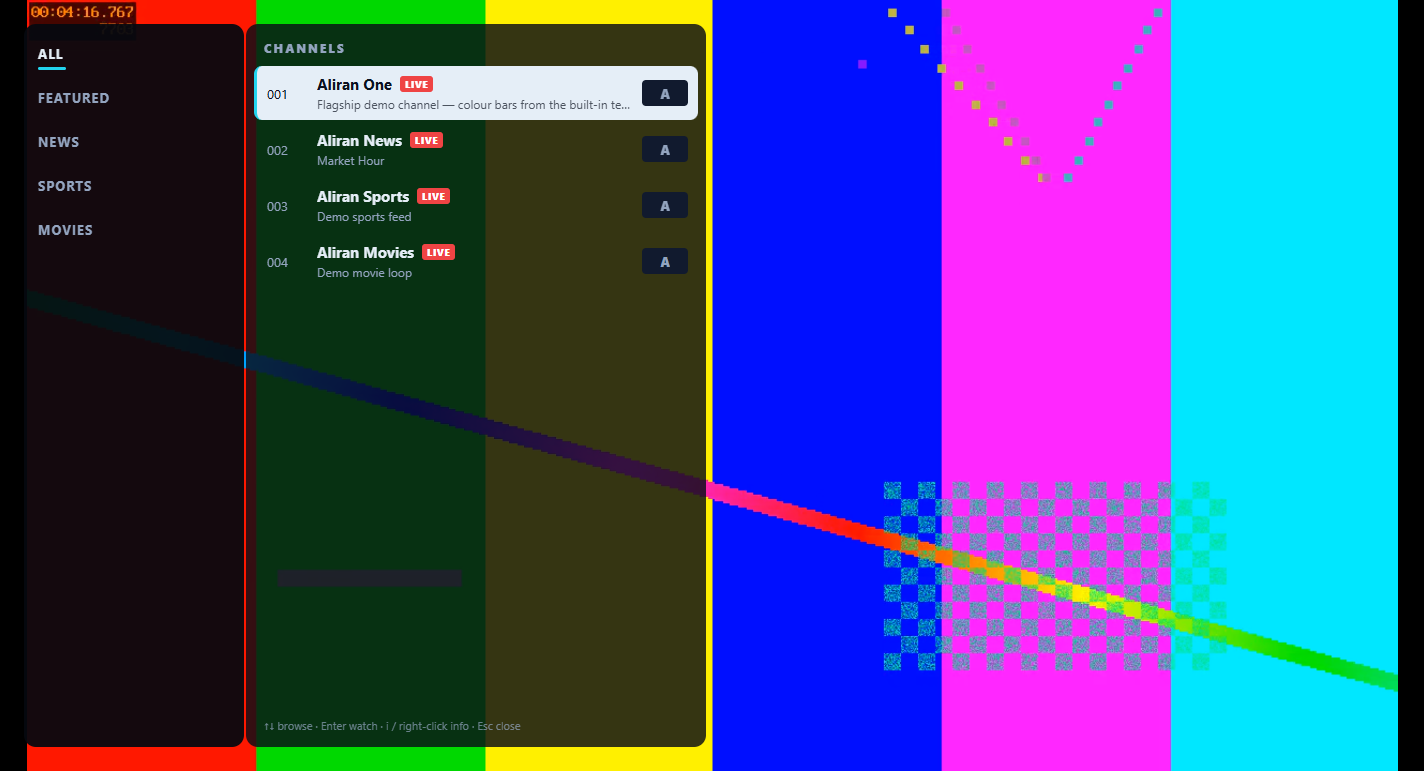
Screenshots on this page and the viewer guide show demo channels from the
broadcaster's built-in test source (colour bars) — every UI element is real.
1. Architecture
Electron MAIN process                     Electron RENDERER (sandboxed)
┌─────────────────────────────┐           ┌──────────────────────────────┐
│ @aliran/player-sdk          │  IPC      │ React UI (menu/rail/list/    │
│  swarm · OPRF login ·       │◄─────────►│ info/EPG/settings)           │
│  catalog replication ·      │  bridge   │ hls.js/MSE over <video>      │
│  localhost HLS serving      │           │  http://127.0.0.1:<port>     │
│ safeStorage credentials     │           │  (or the redirect URL)       │
└─────────────────────────────┘           └──────────────────────────────┘
- All engine access stays in main. The renderer runs with
contextIsolation: true,sandbox: true, nonodeIntegration. A preload script exposes exactly three calls: send message, event feed, and state snapshot. The message protocol is the same one the Android worklet speaks (client/backend/backend.mjs), so the two apps' screens stay portable. - Media never leaves the machine. P2P channels are served by the
engine on
127.0.0.1and decoded by Chromium's MSE; redirect channels play their operator URL directly. - Saved credentials use
safeStorage(DPAPI on Windows) — encrypted at rest. The password is never sent back to the renderer: the splash's auto-login is fulfilled entirely inside the main process. When the OS offers no encryption, the app simply does not save credentials — it still works, but every boot lands on Login. - Session store (
aliran-storeunder the app's user-data dir) is the SDK's disposable replica cache. Corruption self-heals, and deleting it while the app is closed is always safe.
Playback contracts (ported from <AliranVideo>)
The renderer's HlsVideo component reimplements the RN binding's
device-proven behaviors on hls.js. They matter for any custom host:
- Tune lifecycle from engine confirmations, not player events. ONE
localhost URL serves every P2P channel, so after a zap the previous
channel keeps playing under the same URL until the engine flips the
feed. The tuning pill completes only when the engine confirmed the
serve (
portreply for this channel) and the current player mount produced an advancing playhead. feed-changed→ remount the player behind the same URL (broadcaster restart or rotation) to flush the stale playlist.- Frozen-live-edge ladder. A playhead still for 12 s while "playing"
forces a reload at the live edge. A second consecutive failed resync
calls
reconnectActiveFeed()(wedged-transport teardown) first. - VOD. A
type:'vod'title disarms the ladder — a paused, seeking, or finished playhead is by design — and the bottom bar grows a seek/pause transport. The desktop transport is implemented against the same contracts as the phone app's; its live-VPS pass is pending an operator library deployment with granted titles.
2. Two flavors, one codebase
The app resolves its service descriptor from two sources. This is the whole difference between the distribution flavors, and it mirrors the phone app's baked-vs-runtime descriptor paths:
- Operator build —
config/service.jsonexists at build time and is baked into the artifact. The app boots straight to splash/login; viewers never see a key. One build per deployment, like a branded APK. - Public build — packaged with no
service.json. First run opens a Connect screen: the viewer enters the three things any Aliran operator hands out — the service pairing code (12 characters in three groups of four,A3K7-9QF2-M4XR), a username, and a password. One click swaps the code boxes for the full 64-character panel public key, for operators who hand that out instead. The app resolves the code over the DHT, checks that the key it receives really owns that code, signs in, and persists the key in the user profile (aliran-service.jsonunder the app's user-data dir). Every later launch auto-authorizes like an operator build. Settings → Change service… forgets the key and saved sign-in, and restarts to the Connect screen.
A baked descriptor always wins over a runtime-entered one. So an operator build ignores any previously stored key on the machine.
For internal/test builds, the descriptor may carry a dev block
("dev": { "username": "…", "password": "…" }). It pre-fills the Login
screen and, since the Electron 43 update, signs the app in by itself on
first boot (saved credentials, when present, still win). It exists for
operator smoke tests and dev builds only. Never bake a dev block into
anything you hand to viewers — note that the public flavor cannot carry
one by construction, since it bakes no descriptor at all.
Distributing the public build? Hand your viewers the viewer guide — install + SmartScreen, the Connect screen, everyday use, and the honest bandwidth/privacy notes, written for non-technical users.
3. Run from the repo (development)
npm install                     # repo root — desktop/ is a workspace member
cd desktop
cp config/service.example.json config/service.json   # set your panelPubKey
npm run build                   # esbuild → renderer/dist/
npx electron .
config/service.json is the same operator service-descriptor contract as
the phone app — panel public key, optional branding colors/wallpaper/logo,
and section toggles — and it is gitignored, one descriptor per deployment.
Without it, the app opens on the Connect screen (dev runs then behave
like the public flavor).
Keyboard map (the D-pad patterns on desktop keys):
| Context | Keys |
|---|---|
| Fullscreen video | ↑/↓ zap · Enter/click channel list · i info · f favorite · c subtitles/audio · Space pause (VOD) · Esc menu |
| Channel list | ↑/↓ rows · ←/→ rail↔list · Enter watch · i/right-click detail · Esc unwind (sub-category → parent → close) |
| Everywhere else | Arrows + Enter navigate · Esc back |
The browse overlay auto-hides after 6 s idle — playback is never interrupted by browsing. The bottom bar and the mouse cursor fade over clean video and return on any activity.
4. Package (installer + portable + mac)
cd desktop
npm run dist        # Windows: electron-builder → dist/Aliran Setup <v>.exe + Aliran-<v>-portable.exe
npm run dist:mac    # macOS (run on a Mac): electron-builder → dist/Aliran-<v>[-arm64].dmg + .zip
- The flavor is decided by what's on disk when you package. With
config/service.jsonpresent, you get an operator build — the descriptor is baked as an extra resource, like the phone APK bundles its descriptor. Without it, you get the public build (Connect screen on first run). The installer is per-user (no admin prompt); the portable exe runs from anywhere. - The builds are unsigned. There is no code-signing certificate, so
Windows SmartScreen will show "Windows protected your PC" with an
unknown publisher on first run — users click More info → Run anyway.
That is the honest reality of unsigned distribution. Operators shipping
to real users should countersign with their own certificate
(electron-builder's
win.signtoolOptions), which also builds SmartScreen reputation over time. - OS floors (Electron 37): Windows 10 or newer (x64), macOS 13 Ventura or newer (Apple silicon + Intel).
- macOS. The engine's native modules all ship darwin (arm64 + x64)
N-API prebuilds, so the same package step works on a Mac —
npm run dist:mac— and the repo'sdesktop-macGitHub Actions workflow (manual dispatch) produces the same artifacts on a hosted mac runner. Because CI has noconfig/service.json, those are always the public flavor. The mac builds carry only the ad-hoc signature, so Gatekeeper blocks the first launch. On macOS 15+ the user approves it under System Settings → Privacy & Security → Open Anyway (older macOS: right-click → Open), once per machine. Operators with an Apple Developer account should sign and notarize instead (electron-buildermac.identity+notarize), which removes that friction. - Per-brand desktop packaging (the
client/brands/<id>/white-label flow) is a follow-up. Today the icon and product name are set indesktop/electron-builder.yml, while the in-app branding — colors, name, logo, wallpaper — flows from the descriptor at runtime. So a brand'sservice.jsonworks here unchanged (see White-label branding).
5. Codecs (what this player can decode)
The engine passes streams through untouched (copy end to end), so
playback is bounded by what Chromium/MSE on the host machine can
decode:
- H.264 + AAC: works everywhere; the bulk of a typical lineup.
- HEVC (H.265): depends on platform hardware decode. Chromium exposes HEVC only when the GPU/driver decodes it (most Intel/AMD/NVIDIA GPUs from the last decade do). Verified on the reference deployment: two HEVC 1080p channels play at full 1920×1080 on a machine with hardware HEVC. On a machine without it, the player surfaces a clean per-channel error ("This device can't decode this channel's video format") instead of a black screen — the channel list keeps working.
- Compared to the Android app: ExoPlayer on the S22 also plays both, so the two clients cover the same lineup. The desktop's HEVC support just varies per PC, where the phone's is fixed per device model.
In-stream subtitle/CC and audio tracks are selectable from the CC
button / c key (hls.js reports the tracks; selection is by index — flat
and reliable, unlike the ExoPlayer group-index pitfall the phone app
works around).
6. Troubleshooting
| Symptom | Cause / fix |
|---|---|
| Connect screen at start | The build has no baked descriptor (public flavor / dev without config/service.json) — enter the operator's pairing code (or panel key) + account; it persists. |
| Login/Connect spins ~1 min then "Cannot reach the service" | The DHT is unreachable — check the network — or (public flavor) the panel key is wrong/mistyped; the main process already retried the transient window for you. |
| "No service answered that code" | The pairing code is mistyped, or the panel is down / unreachable. Re-check the code with the operator, then press Connect again. |
| "A service answered that code but could not prove it owns it" | Do not retry blindly and do not enter your password. The app found a peer whose panel key does not match the code, and refused it. Confirm the code with your operator. |
| SmartScreen blocks first run | Unsigned build (see §4): More info → Run anyway. |
| A channel shows the codec error | The host GPU can't decode that channel's codec (usually HEVC on an older PC) — every other channel keeps working. |
Frequent store:reset status lines |
The disposable replica cache self-healed after unclean exits; if constant, check disk health/space under the app's user-data dir. |
| Two copies fight over the store | The app is single-instance per user-data dir by design; a second launch focuses the first window. |